×

Language and Currency

Choose your language

Category

Resources

How to build the perfect vocal chain with plugins

A vocal chain is the sequence of plugins on your vocal track, in a specific order, from raw recording to finished mix. The order matters more than the specific plugins you pick. Get it backwards and every plugin fights the one before it. Get it right and each one makes the next one’s job easier.

This isn’t a shopping list. It’s a framework. Once you understand why each slot exists, you can swap in whatever tools you’ve got and the chain still works.


The signal flow


1. Gain staging

Set your input level before anything else. Most analog-modeled plugins expect signal around -18 dBFS. Feed them a track that’s pinned at -6 dB and you’re overdriving the models before any real processing happens.

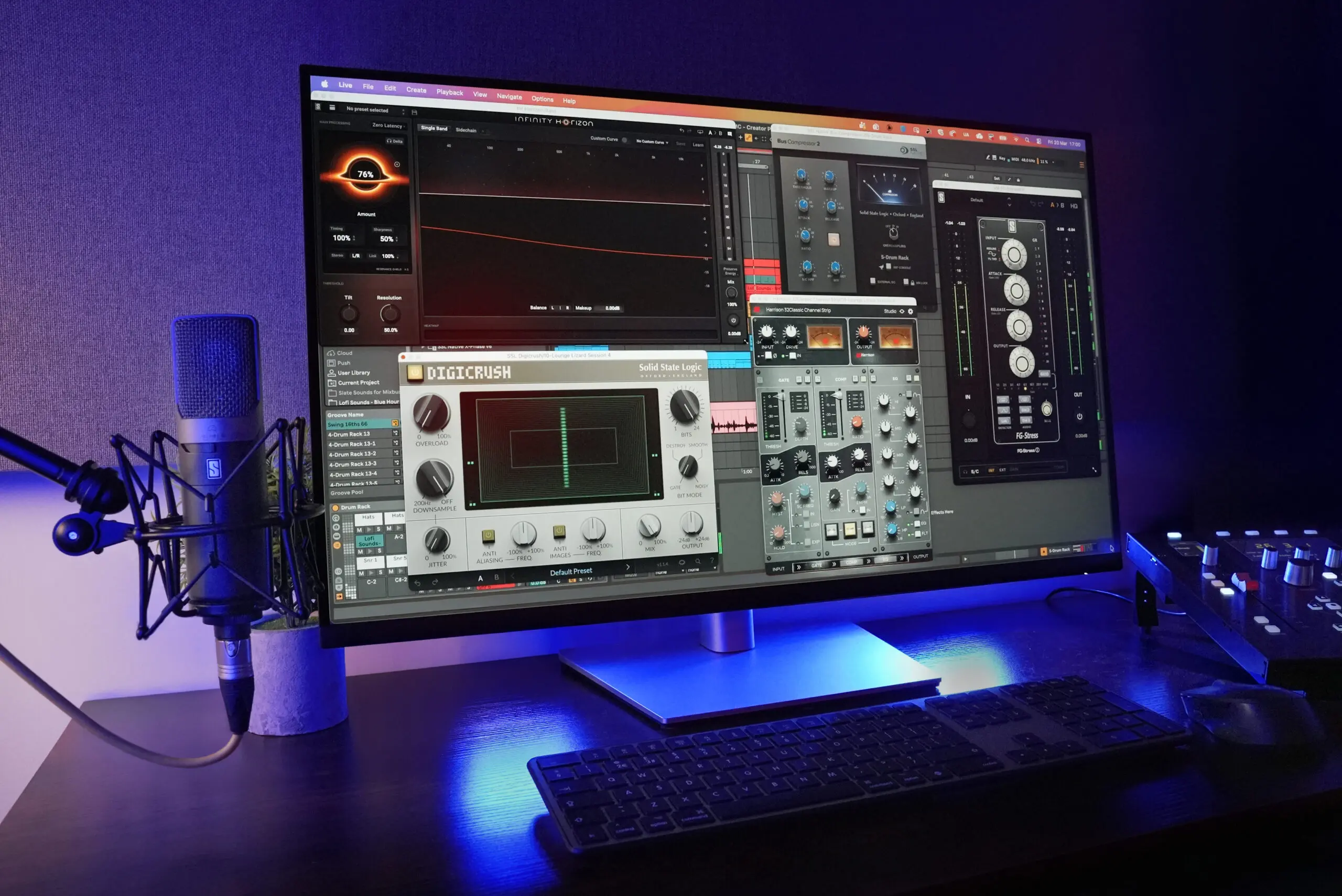
A trim plugin at the top of the chain fixes this in two seconds. In Virtual Mix Rack, the first module slot works well for a preamp module. Set the level there and move on.


2. Subtractive EQ

Cut before you boost. Always.

Roll off the low end below 80-100 Hz. There’s nothing useful down there on most vocals, and it’s eating headroom. Then sweep around for any resonant frequencies that poke out when the singer hits certain notes. This is cleanup, not tone shaping. You’re removing problems so the compressor doesn’t react to them.

Infinity EQ’s spectrum analyzer makes it easy to spot the resonances visually, but any clean parametric EQ does the same job.


3. De-essing (first pass)

Here’s the thing most people get wrong: sibilance gets louder after compression. If you only de-ess after the compressor, you’ll need aggressive settings that make consonants sound lispy.

A light de-esser before compression catches the worst “s” and “t” peaks so the compressor sees a more even signal. Don’t overdo it. You’re shaving peaks, not removing consonants. A second, lighter pass after compression can catch whatever’s left.


4. Compression

This is where the vocal stops jumping around and starts sitting in the mix. The goal: reduce the dynamic range enough that the vocal feels consistent without sounding squeezed.

Two compressors in series, each doing moderate work (3-6 dB of gain reduction), can sound better than one compressor doing all the heavy lifting. The first one catches peaks. The second smooths out the level. Together they sound more natural than either one doing all the work.

In Virtual Mix Rack, you can stack compressor modules in the same plugin window. The FG-116 for fast peak control followed by the FG-2A for smooth leveling is worth trying. 


5. Additive EQ and tone shaping

Now that dynamics are controlled, boosts will stick where you put them instead of spiking unevenly.

Fresh Air was built for this stage. It adds high-frequency clarity without the harshness that a standard shelf boost introduces. Single knob, free, does one thing well. If the vocal also needs body in the low-mids, handle that on a separate EQ with a broad bell.


6. Saturation (optional)

A touch of harmonic saturation can add warmth and help a vocal cut through a dense arrangement. Tape emulation, tube modeling, console-style coloring. Keep it subtle. If you can hear the saturation as distortion, back it off.


7. Reverb and delay (send effects)

These go on aux/send channels, not directly on the vocal insert. That distinction matters. You want the dry vocal upfront and the sends creating space around it.

A short room reverb on one send, a longer plate or hall on another, and maybe a slapback delay at 80-120ms with no feedback. That gives you depth without washing anything out.
Common mistakes

Wrong processing order is the most common, and the most fixable.

Over-compressing is the second. If the vocal sounds flat and lifeless, you’ve crushed too much dynamic range. Back off the ratio or raise the threshold. This is the fix most of the time.

Boosting before cutting means your compressor reacts to frequencies you don’t even want in the final vocal. Cut first.

And the sneaky one: soloing the vocal while you mix. Decisions that sound great in solo frequently sound terrible in context. Check against the full mix constantly.


The short version

Trim the level. Cut the junk. Tame the sibilance. Compress for consistency. Shape the tone. Add space with sends.

The specific plugins matter less than the order and the intent behind each stage. If you want to try this with minimal plugin windows, Virtual Mix Rack handles stages 1 through 4 inside one instance. Add Fresh Air after it for the top-end polish. That’s two plugin windows covering most of the chain.

How We Modeled the Classic LA-3A: The SD-3A Story

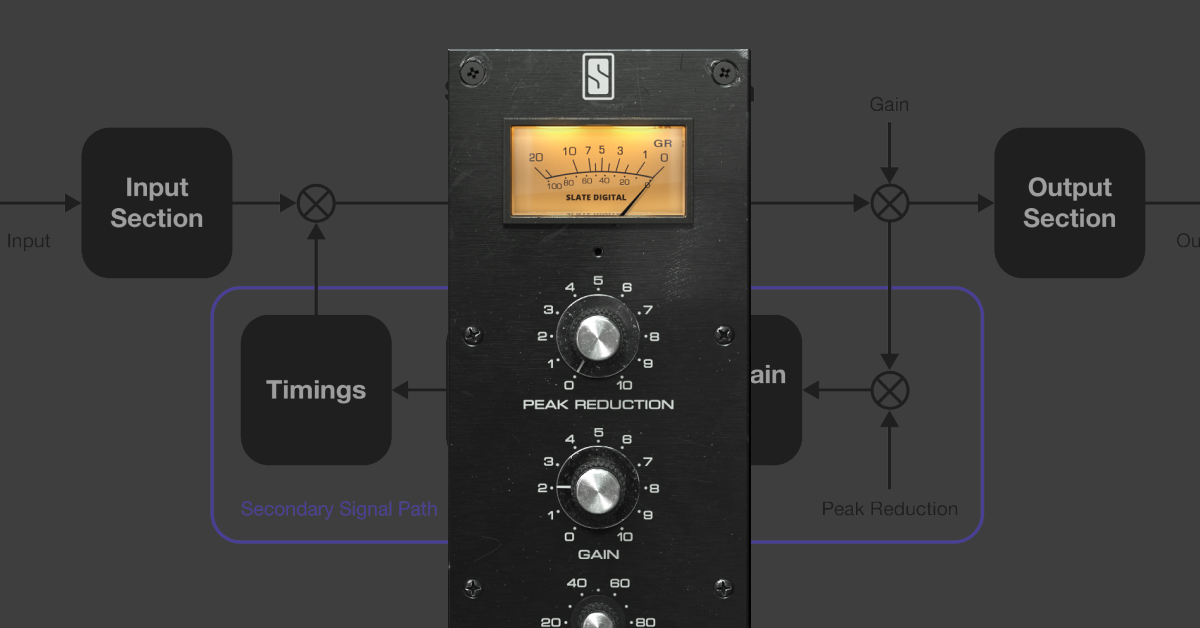
The SD-3A is a VMR module that recreates the Teletronix LA-3A leveling amplifier, a feedback optical compressor developed by Urei in the late 1960s.

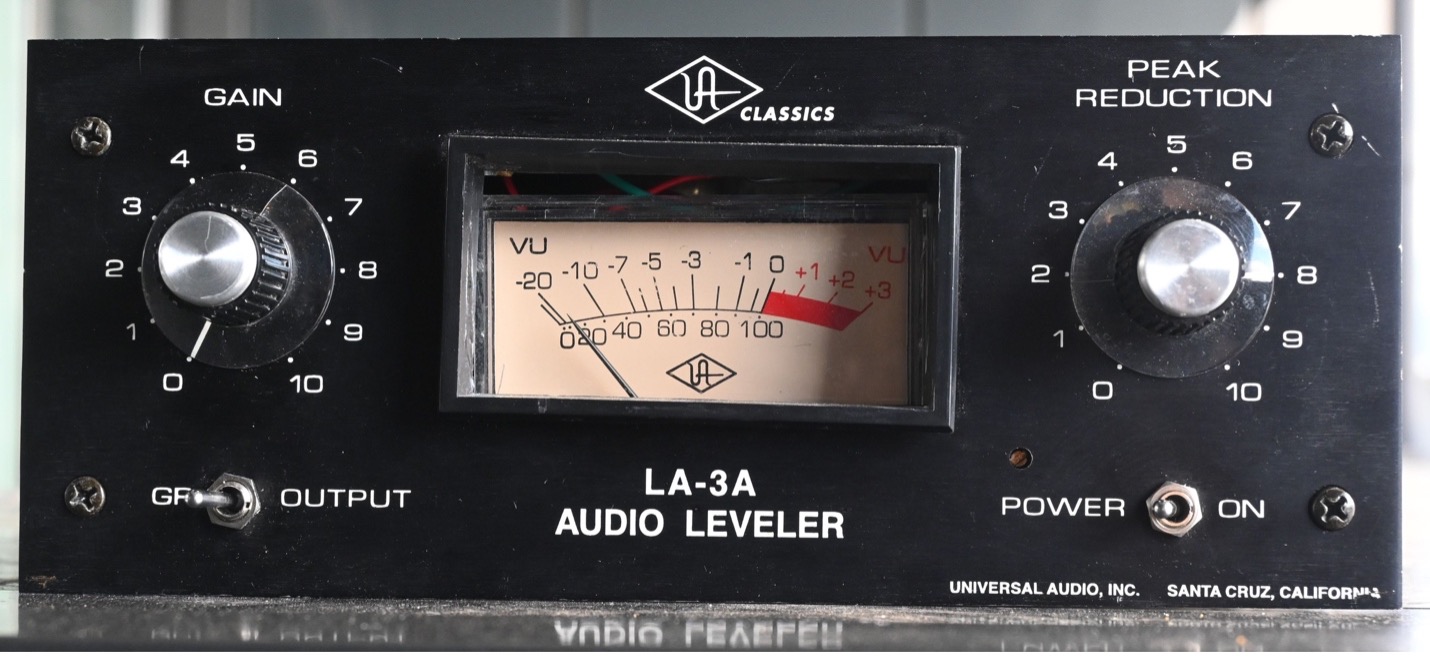
We used the UA re-issue as a hardware reference.

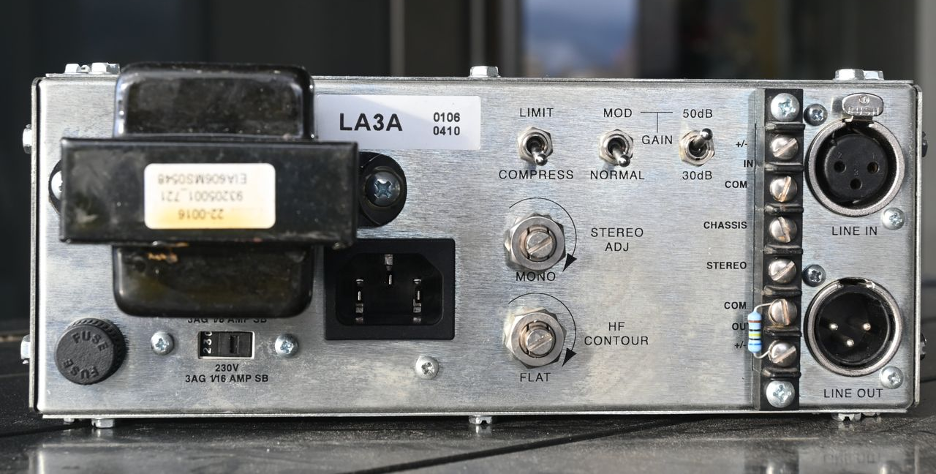
The LA-3A is simple to use with only 2 knobs: a peak reduction knob  adjusting the amount of compression and one make up gain knob. There are two compression modes that can be selected on the back panel (limit and compress) as well as high frequency(hf) contour screw to adjust how the compressor responds to high frequency content.

Like its predecessor, the LA-2A, the LA-3A uses a T4 electro-optical cell to control gain reduction, offering a smooth and natural compression sound. While sharing components with the famous UA 1176 level amplifier developed a few years earlier, it’s the LA-3A’s use of solid-state amplifiers instead of tube based amps which contributes to its punchier and more transparent sound.

While the LA-2A is famous for its use on vocals, the LA-3A is reactive enough to be used on any type of audio content, including drums.

Modeling

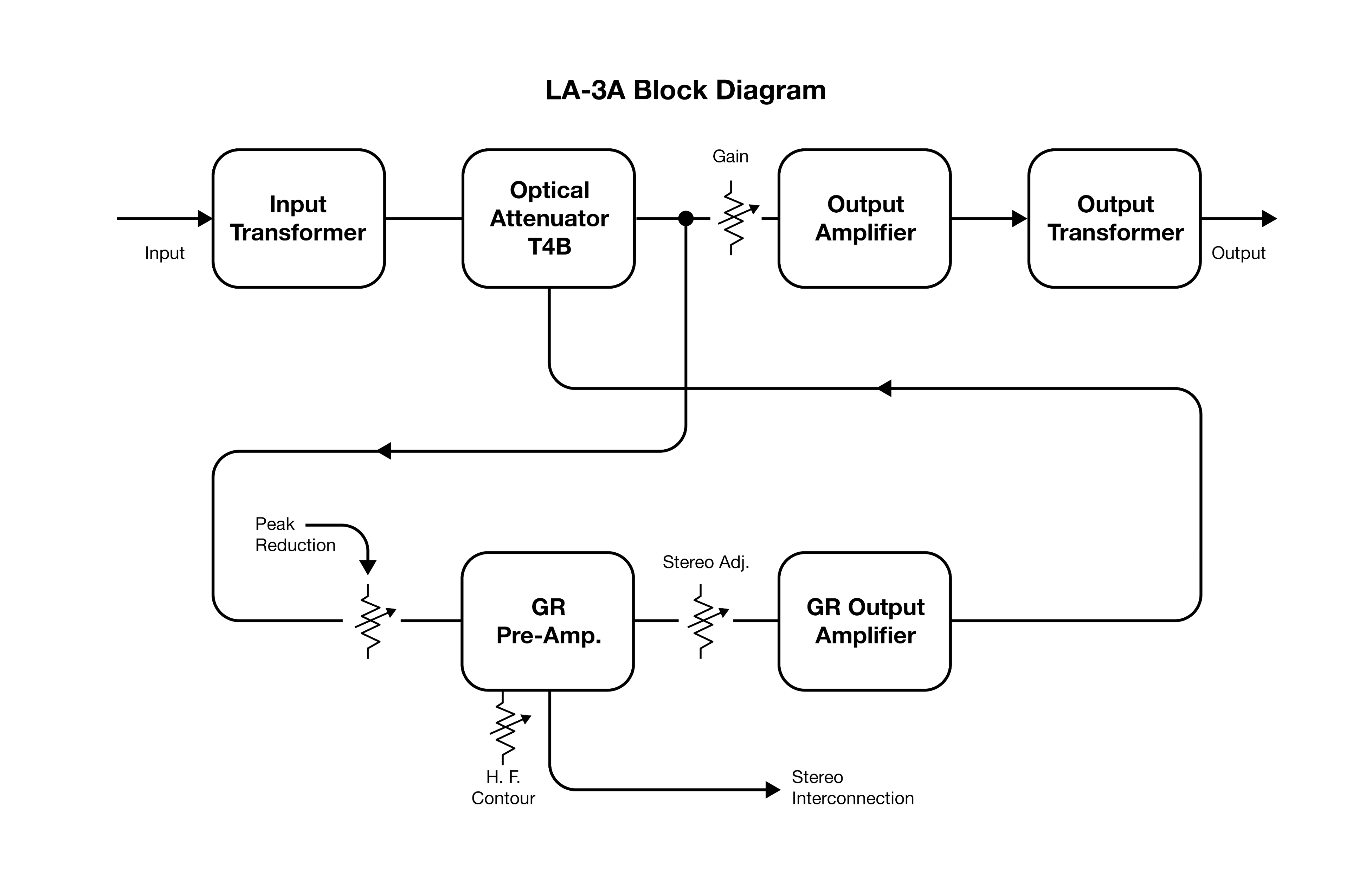
LA-3A Block Diagram (from the original instruction manual)

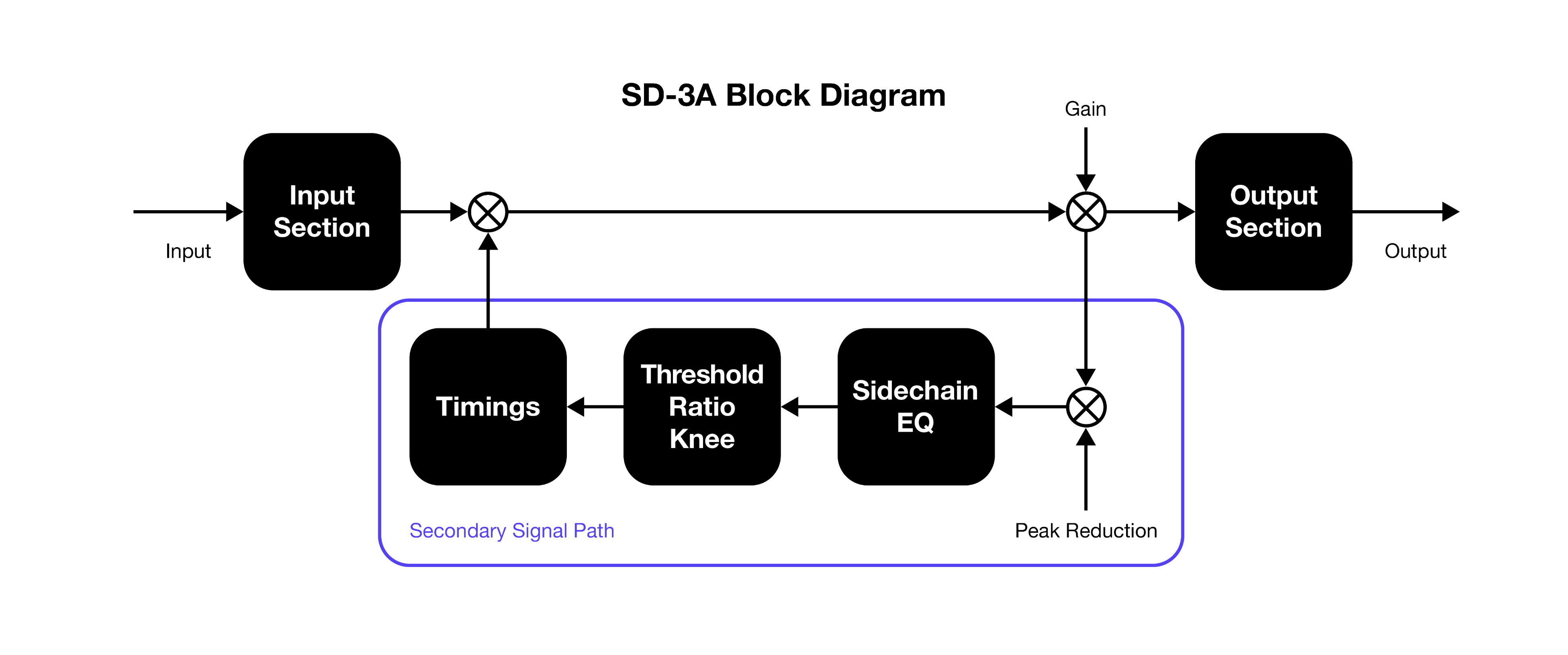
SD-3A block diagram

Input/Output

Although designed to be as transparent as possible in the audible range, the LA-3A is made of electrical components that are not perfect and have an influence on the sound. We can measure these imperfections by turning the Peak Reduction knob to its minimum value, ensuring that the compression does not disturb the pass-through measurement.

Transformers

Transformers are used to transfer energy from one electrical circuit to another and step voltages up or down, match impedance, eliminate ground loops, and block DC signals. That’s why they are widely used in audio equipment.

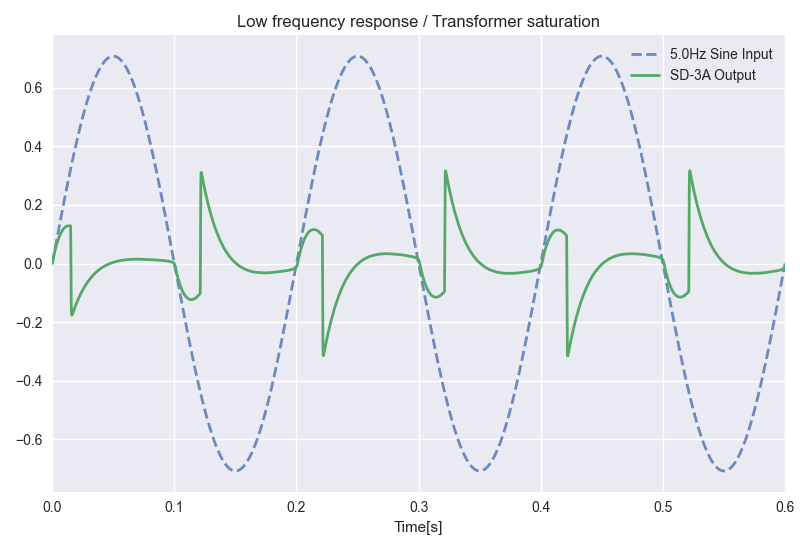
We won’t dive into the complex world of transformer modeling here, but we can simply say that they consist of two long wires wrapped around a magnetic core. This magnetic component leads to a characteristic low frequency saturation as shown below.

Equalization and harmonic distortion

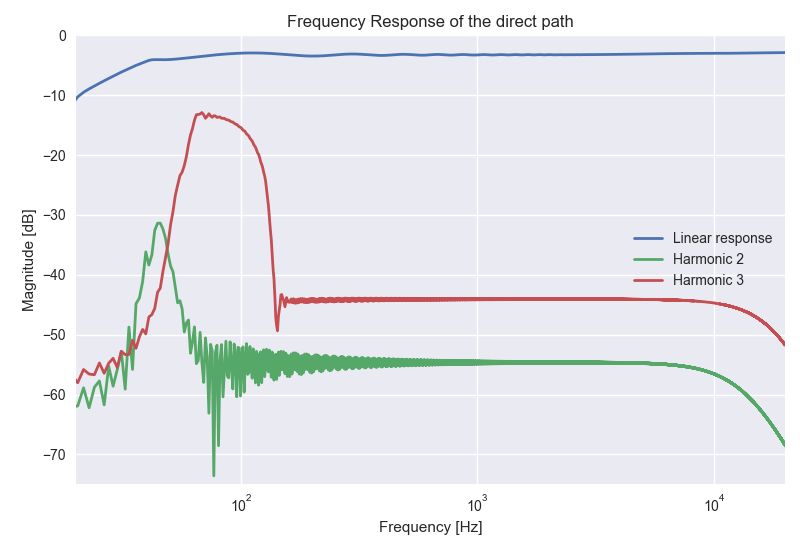
The subtle behavior of all the other analog components can be modeled using standard equalization and non-linear functions. The LA-3A has a clean, flat response with subtle harmonics. At low frequency we can see the effect of the transformer saturation.

Secondary signal path

To model the optical attenuation of the original unit, we derive a secondary signal path. This part of the algorithm has the job to accurately compute the amount of compression to apply to the audio to obtain the compressed output. We call this signal Gain Reduction or GR.

As in, we use a feedback topology where the input to the secondary path is taken after the gain has been applied.

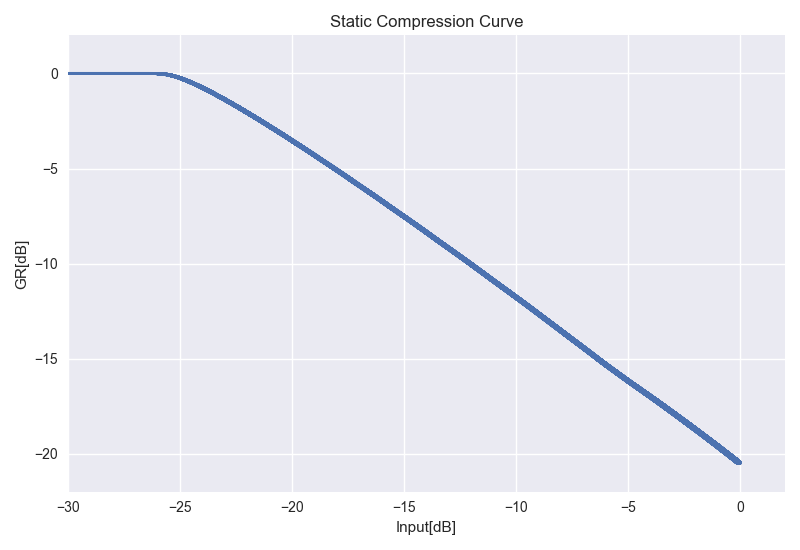
Static Compression Curve

The LA-3A has a fixed-threshold, fixed-ratio, and soft-knee. The user can modify the gain of the signal entering the secondary path with the Peak Reduction knob to trigger more or less compression.

Frequency dependence

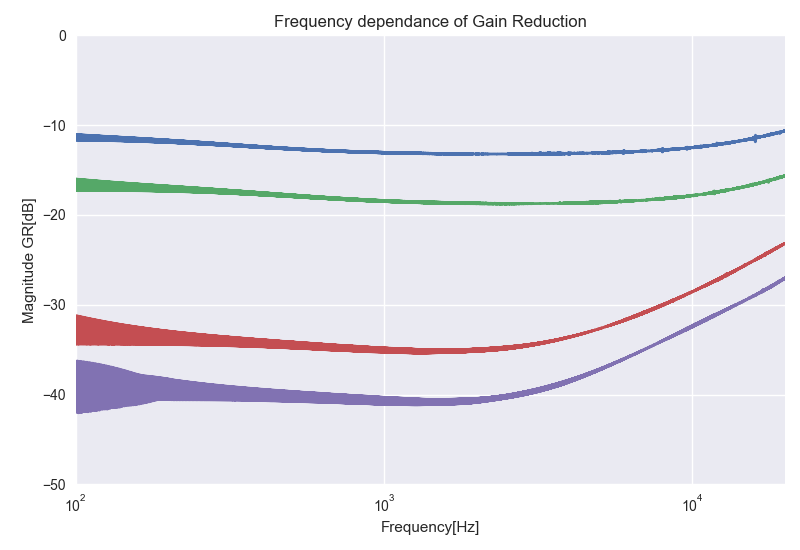
The amount of gain reduction of the LA-3A is frequency dependent.

Even with the HF Contour screw in the flat position: the hardware compresses the high frequencies less than the low frequencies in a level dependent manner and SD-3A will recreate this accurately.

Turning the HF Contour control lets you tune the amount of compression around 5kHz.

Timings

At the heart of the leveling amplifier is the electro-optical attenuator that consists of photo-conductive cells optically coupled to an electro-luminescent light source. The intensity of the light is proportional to the input audio voltage. This video by analogvibes is a good introduction to the inner workings of such cell: What the heck is a T4 cell? Teletronix LA2A – BYL-Series I, Part III – analogvibes

Play

We carefully identified and modelled all the specific behaviors of the compression timings which are key in the character of the compressor. Since these timings depend on many factors, we measured them across a wide range of conditions to ensure accuracy.


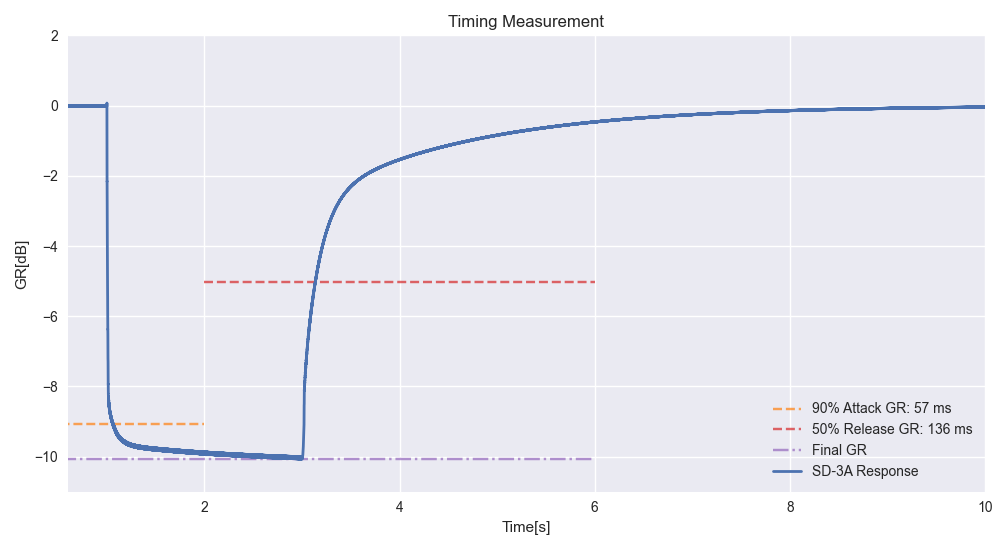
1. Attack and release in compress mode PR=5

  • On this example, you can see the plugin takes about 60ms to attack to 90% of the final gain reduction target.
  • It takes about 150 ms to release 50% of the target but will take about 10 seconds to go back to a fully released state.


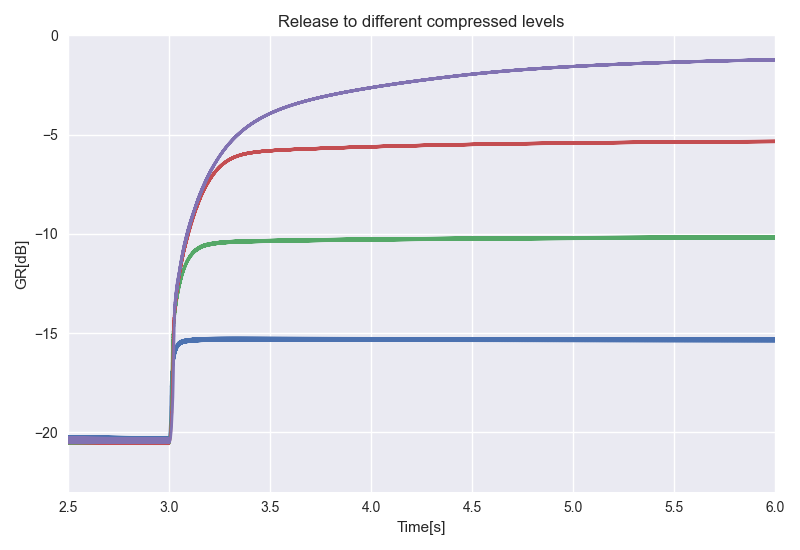
2. The release is faster after a short compression time and slower after a long compression time, which is called a program-dependent behavior.


3. For a specific input level, the release always starts with the same shape no matter what the next level is.


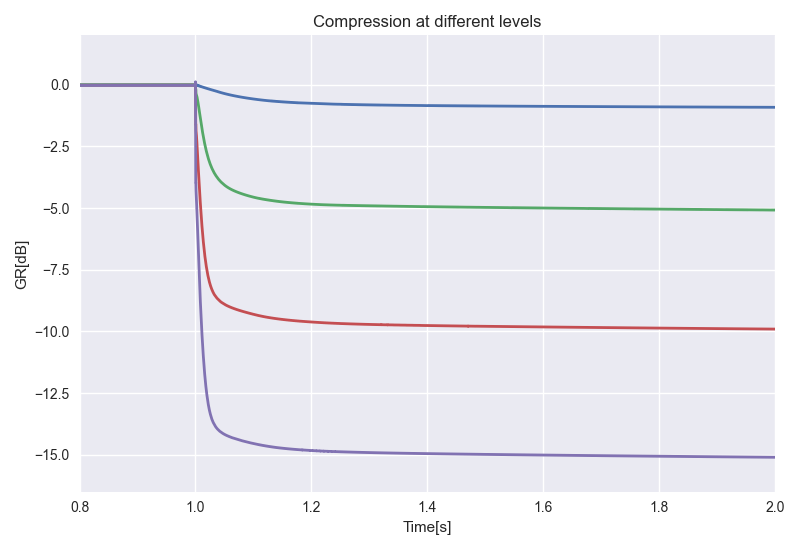
4. The attack time depends on the input level: it is slower for lower levels and faster for higher levels.


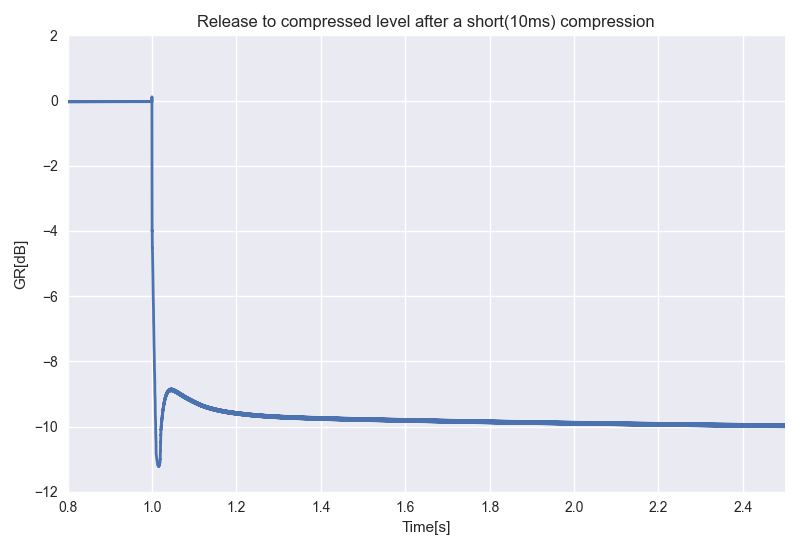
5. When releasing to a lower compressed level after a short compression period, the release is so fast that it exceeds its target level, causing the system to switch back to compression.


Listen In

Now for the fun part, let’s dig into how it actually sounds. Make sure you’re listening with some monitors or headphones to get the full experience.


Drums

Here’s an example on a drum buss, with around 5 to 7 dB of Gain Reduction using the Limit mode to get that powerful drum sound:

Dry


With SD-3A


Guitar

Here’s another example on an acoustic guitar, with the HF Contour engaged, compressing more the HF and allowing us to control the strong picking sound while maintaining the original tone:

Dry


With SD-3A

The SD-3A is the most accurate model of this classical piece of gear, making it a compressor that is easy to use and that works on everything, from vocals to drums. Try the new plugin and 140+ more in the Complete Access Bundle. 

Try for FreeBuy Perpetual License for $99

All product names and trademarks are the property of their respective owners, which are in no way associated or affiliated with Slate Digital. Product names are used solely for the purpose of identifying the specific products that were studied during our modeling process. Use of these names does not imply any co-operation or endorsement.